

Todoist — Cross-platform task manager known for fast natural-language input and clean projects
What it is
Todoist (by Doist) is a task manager that nails capture: type 'email Dana Friday 3pm' and it parses the due date. Projects, labels, filters and a gamified karma streak keep lists alive across every platform. Reminders, filters beyond basics and calendar sync sit behind the Pro subscription, which is the main fork in the road.
Editor's review
Long-form introduction by the BetterPicker editors · checked against the official site · Oct 9, 2026
Todoist is the task manager to pick when you want something that is still fast and tidy after years of daily use. Natural-language capture, clean projects, and native apps on every platform make it the rare productivity tool that stays out of your way. It has been updated continuously for over a decade without losing its snap. The free tier handles casual use under a five-project ceiling, and Pro at $5 per user monthly, billed yearly at $60, is where daily users stop noticing the limits.
What it does well
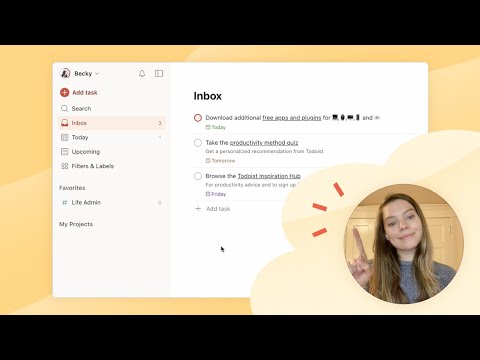
Capture is nearly frictionless. Type pay rent friday 9am and the date parses itself; Quick Add lives on every device, and templates turn repeated routines into one import. The inbox accepts everything and lets future-you sort it out, which is the whole trick. New voice-driven Ramble sessions fit spoken thoughts straight into the same inbox, which matters more than it sounds on a busy day.
Structure stays light. Projects, sections, labels, and up to 150 filters on Pro organize work without imposing a method, and board and calendar layouts cover both planning styles. Nothing demands that you adopt someone's productivity system before the tool becomes useful.
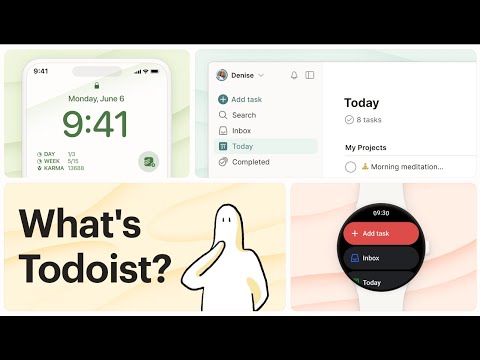
It is fast everywhere. Native apps cover desktop, mobile, watch, and email plugins, with 90-plus integrations and offline-first sync. It launches fast, syncs quietly, and never asks you to rebuild your system after an update. The company publishes SOC 2 Type II compliance for the Business tier, which is unusual care for a task app.
Who it's for
Individuals wrangling work and life in one place, freelancers tracking clients, and practitioners of any methodology who want a tool instead of a religion. Students and families get real value from the free tier alone. Business at $8 per user monthly covers small teams with a shared workspace. It fits poorly as serious project management; heavy dependency chains and reporting want dedicated tools.
Where it falls short
The free tier is deliberately tight. Five personal projects, one week of activity history, and limited Ramble sessions are enough to evaluate but not enough to run a busy life. Treat the free plan as a trial with no timer. Most committed users hit the walls within weeks and either upgrade or chafe.
Team features are the thin end. Business covers the shared-workspace basics, but workloads, dependency chains, and portfolio reporting want Asana, Linear, or ClickUp. Todoist is honest about being a task manager first.
The features you feel are the paid ones. Custom reminders, calendar layout, and task durations all live in Pro. That is a fair trade, but new users should know the satisfaction curve bends upward right at the payment line.
Specs at a glance
Facts from the official site · not editorial opinion
| Pricing | Beginner free; Pro $5/user/mo, $60 billed yearly; Business $8/user/mo plus tax, $96 billed yearly |
|---|---|
| Platforms | Windows, macOS, Linux, iOS, Android, Web, watch |
| Free tier | 5 personal projects, 1-week activity history |
| Pro features | 300 projects, calendar layout, custom reminders, full history |
| Integrations | 90+ including email and calendar plugins |
| Compliance | SOC 2 Type II (Business tier) |
| Company | Doist |
Frequently asked questions
▸What is Todoist?
Todoist is a task manager for organizing work and life into projects, with natural-language due dates, reminders, and layouts from lists to boards. It syncs across phones, computers, and watches. The core loop is capture, organize, and check off, kept deliberately simple.
▸What is the difference between the free and Pro plans?
Free covers 5 personal projects with a week of history. Pro at $5 per user monthly, billed yearly at $60, raises projects to 300, adds calendar layout, custom reminders, task durations, full reporting history, and unlimited Ramble voice sessions.
▸Todoist or Notion?
Todoist is a fast, focused task manager; Notion is a flexible workspace you can build a task system inside. If your main need is reliably capturing and finishing tasks, Todoist wins on speed and mobile feel. If you want docs, wikis, and databases first, start in Notion.
▸Can a team use Todoist?
Yes, the Business plan adds a shared team workspace, up to 500 team projects, roles, activity logs, and centralized billing at $8 per user monthly plus tax. It suits small teams coordinating tasks rather than managing complex multi-team projects.
Reviews on YouTube
5 review videos aggregated · praise and criticism included alike · click through to the original video



Channels that covered it
Channels are aggregated as sources only — we don’t rate creators




Related tools




Where to go next
External links open in a new tab; external content is independent of this site.
Link down? Every object page is re-checked monthly.