

Paperless-ngx — Self-hosted document archive that OCRs your scans and makes every paper searchable
What it is
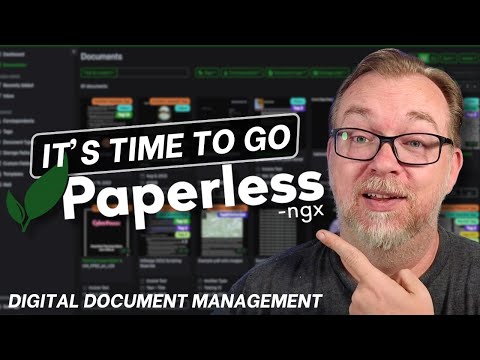
Paperless-ngx is a community-run, self-hosted document management system: feed it scans and PDFs, it OCRs, tags and archives them into a searchable library with correspondents and types. Mobile apps and email ingestion round it out. It is free forever but expects Docker comfort and an afternoon of setup - the classic homelab weekend project.
Editor's review
Long-form introduction by the BetterPicker editors · checked against the official site · Oct 9, 2026
Paperless-ngx is the self-hosted document scanner and filing cabinet that finally replaces the shoebox of PDFs. Feed it paperwork and it OCRs every page, tags it, and makes the whole archive searchable by content, with version 3.3.0 shipping in October 2026 and development moving steadily. It is free, open source, and happy on a low-power machine. The trade is the usual self-hosting bill: Docker, storage, and backups belong to you. For households willing to run one more service, it earns its place fast.
What it does well
Search is the entire point, and it works. Every page is OCR'd with support for dozens of languages, so a receipt from three years ago surfaces by a word in its body text, not by the filename you cannot remember. Dates, amounts, and correspondents all become queryable facts. Saved views turn recurring searches, like this year's invoices, into one click.
Getting documents in is automated. A watched consumption folder, email ingestion, and mobile companion apps that photograph paper on the spot cover every practical path. Paper still gets scanned; the shoebox just becomes digital. The classifier learns your tags, correspondents, and document types from your corrections, so filing becomes mostly hands-off over time.
It is mature, current, and light. Version 3.3.0 arrived in October 2026 under GPL 3, the community is large and responsive, and the stack runs comfortably on a Raspberry Pi or an aging NAS. Document management this capable usually arrives attached to a per-seat invoice.
Who it's for
Households drowning in paper, freelancers and small businesses archiving invoices and contracts, and privacy-minded people who want a searchable archive that never leaves their network. Digital minimalists who already run a NAS settle in naturally. It fits anyone comfortable with Docker and a weekend of setup. It fits poorly for organizations needing compliance-grade records management with retention policies and audit trails; that is enterprise software territory.
Where it falls short
You run the stack. Installation is Docker Compose, storage growth is your planning problem, backups are your insurance policy, and upgrades are your calendar. An hour a month keeps it healthy. The documentation is good, but owning the archive means owning its failure modes too.
OCR is good, not magic. Crumpled receipts, handwriting, and poor phone scans produce imperfect text, and some documents need manual correction or retagging. Searchable garbage in still means garbage out, and expectations should be set at excellent-typewritten-text quality.
Multi-user features are basic. Permissions and sharing are simpler than enterprise document systems, and giving an accountant controlled access means thinking about what they can reach. Design for one trusted archive, not a busy portal. Single-family or small-team use is the sweet spot by design.
Specs at a glance
Facts from the official site · not editorial opinion
| Latest release | v3.3.0 (October 2026) |
|---|---|
| License | GPL 3.0, free and open source |
| Deployment | Docker Compose, self-hosted |
| OCR | Tesseract-based, many languages |
| Core features | Full-text search, tags, correspondents, email ingestion |
| Mobile | Companion apps scan documents by phone |
| Cost | Free; runs on low-power hardware |
Frequently asked questions
▸What is Paperless-ngx?
Paperless-ngx is a self-hosted document management system that scans, OCRs, indexes, and archives your paperwork. You point it at documents by upload, watched folder, or email, and it files them with tags and makes every page full-text searchable. It runs on your own hardware via Docker.
▸What hardware do I need to run it?
Modest hardware works: a Raspberry Pi, a mini PC, or a NAS with Docker handles a household archive fine. The main constraint is storage for your documents and OCR processing time on first import. Backups matter more than speed, so plan storage redundancy before volume.
▸How do documents get into it?
Three common paths: upload through the web interface, drop files into a watched consumption folder, or let it ingest attachments from configured email accounts. Mobile companion apps photograph paper directly, and the built-in classifier applies tags and correspondents based on what it has learned from your corrections.
▸Is this suitable for a small business?
Yes, plenty of small businesses run their invoice and contract archives on it, enjoying searchable storage at no license cost. Be aware that retention policies, legal-hold features, and fine-grained permissions are limited compared to enterprise document management, so regulated industries should verify compliance needs first.
Reviews on YouTube
5 review videos aggregated · praise and criticism included alike · click through to the original video
Channels that covered it
Channels are aggregated as sources only — we don’t rate creators



Related tools




Where to go next
External links open in a new tab; external content is independent of this site.
Link down? Every object page is re-checked monthly.